
QUINCY — No matter how much money a school district spends on internet filtering, artificial intelligence, or monitoring software, there is no way to guarantee that students will never encounter something harmful while using a school-issued computer. That was one of the messages Quincy School District Technology Director Shawn Fuller delivered during the October 13 School Board meeting, where he provided a detailed look at the district’s efforts to protect students online.
Fuller’s presentation, Keeping Students Safe Online, outlined the systems used to monitor student activity, identify potential threats, and protect sensitive information. It also addressed several issues that directly affect local families, including the district’s recent decision to block YouTube and certain artificial intelligence platforms, the availability of parental monitoring tools, and an ongoing review of how much time students spend using Chromebooks.
While the district has invested heavily in technology designed to protect students, Fuller emphasized that those systems depend on teachers, administrators, and parents to recognize problems and respond appropriately.
TL;DR
Student monitoring: Quincy School District uses website filtering, encrypted traffic inspection, AI-powered risk alerts, and staff reviews to identify potentially harmful activity on district-managed devices and accounts.
YouTube restrictions: Direct student access to YouTube was blocked October 1 following a review of student usage and privacy concerns. Teachers can still share approved educational videos.
Artificial intelligence: ChatGPT and Claude are blocked for students, while district-approved educational AI platforms remain available.
Potential threats: Monitoring software identifies warning signs involving self-harm, bullying, violence, and threats against schools. District employees investigate concerns before determining whether intervention is necessary.
Parental controls: The iBoss Parent Portal allows parents to review their children’s school Chromebook activity and manage internet access.
Screen time: The district is studying Chromebook usage and developing recommendations for appropriate screen time at different grade levels.
Financial investment: The district spends approximately $25,000 to $30,000 annually on iBoss subscriptions alone, with additional costs for personnel, other security tools, and training.
Parent education: A Digital Safety Parent Night is scheduled for February 16.

Multiple Layers of Protection
Fuller compared the district’s approach to online safety with the security measures used to protect school buildings. Just as schools rely on locked doors, alarms, cameras, and employees to monitor activity, protecting students online requires several systems working together. The district uses a combination of internet filtering, activity monitoring, automated alerts, and human review to identify potential problems, with each layer intended to address limitations in the others.
The foundation of the district’s monitoring system is iBoss, a platform that filters internet access and monitors activity on district-managed student devices. Websites are categorized according to their content, allowing the district to restrict access to inappropriate material such as adult content, gambling, and violence. The Technology Department can also create lists of approved or blocked websites and adjust restrictions for individual schools, grade levels, or students. Elementary students generally have tighter restrictions than high school students, who may require broader access to online resources for research and coursework.
The district maintains a list of more than 500 keywords and phrases used to identify potentially harmful content or attempts to bypass internet restrictions. Those lists are regularly updated as students discover new websites and methods of getting around existing safeguards. Fuller explained that maintaining an effective filtering system requires constant attention because websites, applications, and student behavior continue to change.
Traditional website filtering, however, has limitations. Most modern websites use encrypted connections that prevent outside observers from easily seeing the information being exchanged. While encryption helps protect internet users, it can also prevent schools from identifying concerning searches or activity within otherwise permitted websites. To address that issue, Quincy School District uses a process known as SSL decryption, which allows its monitoring systems to examine more of the information transmitted through encrypted connections on district-managed devices and accounts.
Fuller compared the process to opening an envelope to read the letter inside rather than simply seeing where the envelope was addressed. The additional visibility allows the district to examine internet searches, activity within certain websites, and interactions with artificial intelligence tools. The district expanded these capabilities during the current school year, providing technology staff with more detailed information that can be used to identify potentially dangerous behavior or attempts to circumvent existing restrictions.

Using Artificial Intelligence to Identify Potential Threats
One of the district’s more significant investments involves using artificial intelligence to identify online activity that may indicate a student is in danger or poses a threat to others. The district’s iBoss Risk Manager examines activity for warning signs involving self-harm, bullying, violence, and threats against school buildings or events. Rather than relying entirely on individual keywords, the system can examine surrounding activity to help determine whether a particular search or interaction warrants additional attention.
Fuller used the example of a student searching for a suicide hotline. Such a search might have several explanations, and the system can examine other recent activity to provide additional context before deciding whether to generate an alert. When potentially serious activity is detected, designated district employees receive a notification. Depending on the circumstances, principals, counselors, school resource officers, school safety officers, or other staff members may become involved to determine whether the student needs assistance or whether additional action is necessary.
The reliability of artificial intelligence became a topic of discussion when a student board representative questioned what would happen if the system incorrectly identified someone as engaging in concerning behavior. The question addressed a recognized limitation of AI technology, which can sometimes misinterpret information or reach inaccurate conclusions based on incomplete context. Fuller acknowledged that possibility and explained that the district does not automatically accept every alert as evidence of a problem.
When an alert is received, administrators can request additional information, examine previous searches, and speak directly with the student before determining what action is appropriate. Those steps help staff distinguish between activity that represents a legitimate safety concern and something that may have been misunderstood by the monitoring system. Fuller emphasized that artificial intelligence is intended to bring potential concerns to the attention of school employees, not replace their judgment or make disciplinary decisions on its own.
Human oversight remains an important part of the district’s approach, although Fuller acknowledged that the Technology Department’s four employees cannot monitor every student’s activity in real time. Automated systems operate continuously, while a technology staff member conducts a manual review of higher-risk activity each week. Those reviews help identify concerns that automated alerts may have missed, including newly discovered websites, attempts to bypass restrictions, or patterns of behavior that deserve additional attention. The information is then used to improve the district’s filtering rules and monitoring systems.
Fuller cautioned against assuming that a district-issued Chromebook is completely safe simply because monitoring software has been installed. Students may still encounter inappropriate content or discover ways around existing restrictions, making reports from teachers, administrators, and parents an important part of identifying problems. The district’s approach depends on automated systems providing information and school employees using their experience and knowledge of students to determine when intervention is necessary.

YouTube and Artificial Intelligence Restrictions
The district’s ongoing review of student internet activity has already resulted in noticeable changes to the websites students can access. On October 1, Quincy School District blocked direct student access to YouTube on district-managed systems following a review of student viewing habits and the platform’s terms of service. Fuller told board members that the district’s expanded monitoring capabilities revealed substantial YouTube activity unrelated to schoolwork, raising questions about whether unrestricted access was serving an educational purpose.
A legal review also raised concerns about parental permission requirements for younger users and the handling of student information. According to Fuller’s presentation, the district determined that YouTube’s terms and the absence of a student privacy agreement meeting district requirements created concerns about continued unrestricted access. Those considerations, combined with the amount of nonacademic viewing, led to the October 1 restriction.
The decision does not prevent teachers from using YouTube videos during instruction. Through iBoss Classroom Management, teachers can continue sharing approved educational videos that support classroom lessons. Fuller acknowledged that YouTube contains valuable instructional resources, but the district wants those materials used within a supervised educational setting rather than allowing students unrestricted access to the platform.
The district has taken a similar approach to popular artificial intelligence applications, blocking student access to ChatGPT and Claude. Fuller explained that a review of student activity identified more misuse of AI tools than expected, along with concerns about whether advertised safety settings were consistently effective. The presentation also identified age restrictions and the absence of student privacy agreements that meet district requirements. Claude, for example, requires users to be at least 18 years old.
Those restrictions do not represent a districtwide prohibition on artificial intelligence. Approved educational platforms, including Colleague AI and Gemini for Education, remain available to students, and district administrators are continuing to develop a broader student AI access policy. During a later discussion about district policies, administrators also emphasized the importance of teaching students about artificial intelligence even when they are too young to use the technology directly. Elementary students, for example, need to understand that AI-generated images and information may not be accurate and that an artificial intelligence system is not a real person, even when its responses appear conversational.

Giving Parents and Teachers More Control
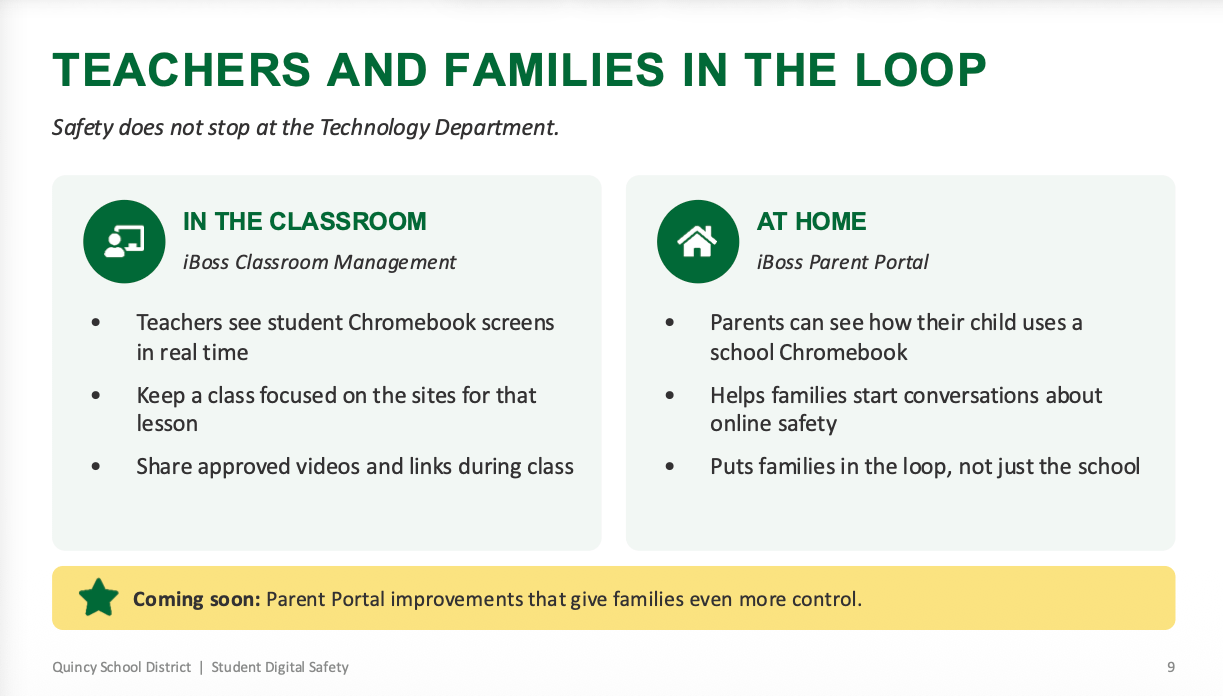
Although much of the district’s monitoring takes place behind the scenes, Fuller emphasized that parents have access to tools that can help them understand how their children use school-issued Chromebooks. The iBoss Parent Portal is a mobile application that allows parents to review online activity on district devices, including websites visited and searches conducted. Fuller explained that the information includes activity during the school day as well as outside school, giving families a clearer picture of how their children are using district technology.
The portal also allows parents to manage internet access on their child’s school Chromebook. A parent who wants a child to stop using the internet at a particular time can disable access through the application. Elementary Chromebooks already have district-established restrictions on internet availability, and parents cannot override those limits, although they can establish additional restrictions of their own. The district is also working on improvements that would provide families with additional control over school-issued devices.
Fuller encouraged parents to use the information as a starting point for conversations about appropriate technology use rather than viewing the portal simply as a disciplinary tool. Seeing that a child spent time on gaming websites during a math lesson, for example, provides an opportunity to discuss classroom expectations and responsible internet use. The district considers family involvement an important part of online safety because students’ technology habits extend beyond the classroom.
Teachers have a separate set of tools through iBoss Classroom Management, which allows them to view student Chromebook screens in real time and determine whether students are working on assigned activities. Teachers can restrict access to distracting websites, limit students to approved resources during a lesson, and share educational videos or links. Fuller reported that teachers are actively using the system and regularly notify the Technology Department when students discover websites or methods of bypassing restrictions, helping the district identify problems that automated monitoring may not immediately detect.
Examining Screen Time in Quincy Classrooms
While protecting students from harmful online content remains a priority, the district is also examining how much time students spend using computers during the school day. The Technology Department, Teaching and Learning Department, and Digital Education team have begun meeting regularly to evaluate Chromebook usage and develop recommendations for appropriate screen time at different grade levels. Fuller explained that the district wants a clearer understanding of how students use technology before deciding whether additional limits or monitoring tools are necessary.
The district has been comparing information collected through iBoss with activity data obtained directly from Google Chromebooks. Technology staff have also developed a prototype reporting system intended to provide a more accurate picture of student usage. Fuller acknowledged that the district’s initial monitoring data did not capture all Chromebook activity, making it necessary to develop additional methods of measuring how much time students spend on their devices.
According to the district’s presentation, Chromebook activity during school days between August 26 and October 15 showed considerable differences between grade levels.
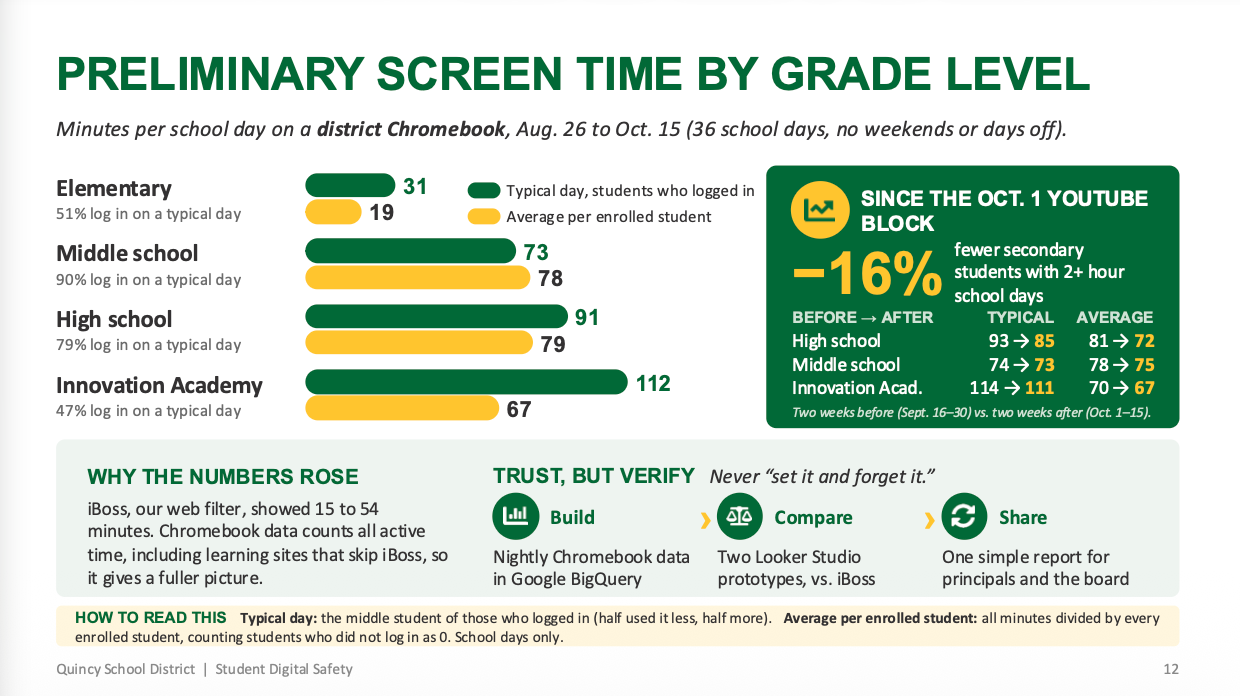
The figures represent two different measurements. Typical daily use reflects the median amount of time among students who logged in, while the average per enrolled student includes students who did not use their Chromebooks that day. The district reported that approximately 51% of elementary students, 90% of middle school students, 79% of high school students, and 47% of Innovation Academy students logged in on a typical school day. The measurements cover activity on district Chromebooks during school days and do not include time spent using personal phones, gaming systems, tablets, or other devices.
The district also examined whether blocking YouTube affected student screen time. Its presentation reported a 16% decline in the number of secondary students spending two or more hours on their Chromebooks during a school day following the October 1 restriction. However, the overall impact varied between schools, and Fuller indicated that the district needs additional information before drawing broader conclusions about how website restrictions affect student technology use.
Board members questioned whether the district intends to establish firm screen time limits or leave those decisions to individual teachers. Fuller explained that the district has not yet determined what its recommendations will look like or how they might be enforced. A strict daily limit could create difficulties for students completing assignments that require extended computer use, while teachers may need flexibility to accommodate different subjects and classroom activities.
District administrators also pointed out that technology requirements differ between subjects and individual students. Career and technical education courses may rely more heavily on computers than other classes, while some students with disabilities require electronic devices for communication and other educational needs. Those differences make it difficult to establish a single limit that would work for every student and classroom, and the district plans to continue evaluating the issue throughout the school year before presenting recommendations to district leadership.
Protecting Student Information and District Accounts
The district’s digital safety efforts also include protecting student records and other sensitive information from unauthorized access. Fuller outlined several security measures implemented during the current school year, including automatic encryption of outgoing emails containing sensitive information. When district systems detect student identification numbers, Social Security numbers, or other protected information in an outgoing message, the email is automatically encrypted so that only the intended recipient can read it. Previously, employees were responsible for recognizing when encryption was necessary and applying it themselves, creating additional opportunities for mistakes.
The district has also implemented data loss prevention tools through Microsoft and Google. These systems monitor attempts to share sensitive student information outside the district and can warn employees or require additional justification before information is transmitted. Fuller acknowledged that the district is still developing these protections and has not implemented the strictest available restrictions, but the additional monitoring is intended to reduce the likelihood of sensitive records being shared improperly.
Other security measures include filtering suspicious emails and conducting regular phishing awareness exercises for employees. These exercises use simulated fraudulent messages to help staff recognize attempts to steal passwords or gain access to district accounts. Fuller explained that a single compromised employee account could potentially expose student records, making staff training an important part of the district’s security strategy. The district is also considering multi-factor authentication for student accounts, which would require an additional verification step beyond a password.

An Ongoing Financial Commitment
Maintaining the district’s digital safety systems requires a significant financial investment. Fuller reported that iBoss subscriptions alone cost approximately $25,000 to $30,000 annually, an amount that does not include every security product used by the district or the personnel costs associated with operating the systems. Additional expenses include software licensing, employee training, legal reviews, policy development, and the staff time required to investigate alerts and respond to concerns.
The work also involves employees outside the Technology Department, including principals, counselors, and other school personnel who respond when potential problems are identified. Fuller explained that digital safety is an ongoing responsibility rather than a one-time purchase because websites, applications, and potential threats continue to change. Maintaining effective protections requires the district to regularly review its systems, adjust restrictions, and evaluate whether additional tools or policies are necessary.
More Resources Planned for Families
The district is planning another Digital Safety Parent Night on February 16, following a similar event held during the previous school year. District officials reported positive participation in the earlier event and intend to continue helping families understand online safety concerns and the tools available to protect their children. The upcoming event will provide another opportunity for parents to learn about district monitoring systems and the resources available for managing school-issued devices.
Other priorities for the remainder of the school year include refining the district’s AI-powered risk monitoring system, completing its student artificial intelligence access policy, and developing recommendations for appropriate screen time. The district also plans to expand phishing education for secondary students, particularly those who use email for college applications, employment opportunities, and other activities. Additional account security measures, including multi-factor authentication, remain under consideration as district officials evaluate future technology needs and associated costs.

What This Means to You
For parents of Quincy School District students, the most immediate takeaway is that you have access to some of the same information the district uses to monitor your child’s school Chromebook. Through the iBoss Parent Portal, you can review websites your child visits and searches made on the device, including activity during school hours. You can also turn off internet access when you want to limit Chromebook use at home. For students, the restrictions mean some familiar websites, including YouTube, ChatGPT, and Claude, are no longer directly accessible on district-managed systems, although teachers can still provide approved educational resources.
Families should also understand that searches and other activity on school-managed devices and accounts may be reviewed by district staff if the monitoring system identifies a potential safety concern. Parents who have not used the Parent Portal can contact the district for information about accessing it, and the February 16 Digital Safety Parent Night will offer another opportunity to learn about online safety and the tools available to families.
Keeping Safety and Learning Connected
The October 13 presentation offered a look at how much work takes place beyond the classroom to protect students using district technology. Quincy School District has invested in systems designed to identify potential threats, protect student information, and give teachers greater control over how computers are used for instruction. At the same time, district leaders are examining where technology is most beneficial, when restrictions are appropriate, and how to balance digital learning with concerns about screen time. Fuller’s acknowledgment that no monitoring system is perfect serves as an important reminder that even the best technology depends on the people using it. As these tools and policies continue to develop, the responsibility for helping children navigate the digital world will remain shared by educators, students, and families throughout the 98848.